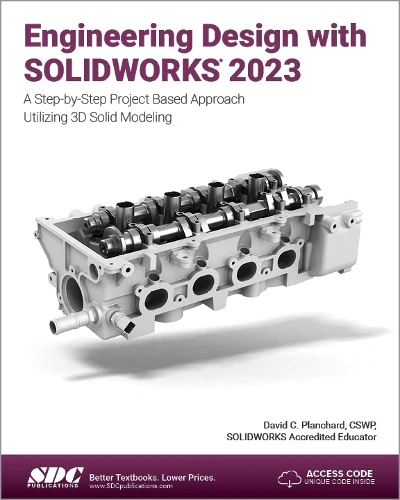
Engineering Design with SOLIDWORKS 2023
Engineering Design with SOLIDWORKS 2023 is written to assist students, designers, engineers, and professionals. The book provides a solid foundation in SOLIDWORKS by utilising projects with step-by-step instructions suitable for beginner to intermediate SOLIDWORKS users. It features machined, plastic, and sheet metal components.
Desired outcomes and usage competencies are listed for each project. The book is divided into five sections with 11 projects.
Project 1 - Project 6: Explore the SOLIDWORKS User Interface and CommandManager, Document and System properties, simple and complex parts and assemblies, proper design intent, design tables, configurations, multi-sheet, multi-view drawings, BOMs, and Revision tables using basic and advanced features. Additional techniques include the edit and reuse of features, parts, and assemblies through symmetry, patterns, configurations, SOLIDWORKS 3D ContentCentral, and the SOLIDWORKS Toolbox.
Project 7: Understand Top-Down assembly modelling and Sheet Metal parts. Develop components In-Context with InPlace Mates, along with the ability to import parts using the Top-Down assembly method. Convert a solid part into a Sheet Metal part and insert and apply various Sheet Metal features.
Project 8 - Project 9: Recognise SOLIDWORKS Simulation and Intelligent Modelling techniques. Understand a general overview of SOLIDWORKS Simulation and the types of questions included in the SOLIDWORKS Simulation Associate - Finite Element Analysis (CSWSA-FEA) exam. Apply design intent and intelligent modelling techniques in a sketch, feature, part, plane, assembly, and drawing.
Project 10: Comprehend the differences between additive and subtractive manufacturing. Understand 3D printer terminology alongside a working knowledge of preparing, saving, and printing CAD models on a low-cost printer.
Project 11: Review the Certified SOLIDWORKS Associate (CSWA) programme. Understand the curriculum and categories of the CSWA exam and the required model knowledge necessary to successfully take the exam.
The author developed the industry scenarios by combining his own industry experience with the knowledge of engineers, department managers, vendors, and manufacturers. These professionals are directly involved with SOLIDWORKS every day. Their responsibilities extend far beyond the creation of just a 3D model.
Engineering Design with SOLIDWORKS 2023 is written to assist students, designers, engineers, and professionals. The book provides a solid foundation in SOLIDWORKS by utilising projects with step-by-step instructions suitable for beginner to intermediate SOLIDWORKS users. It features machined, plastic, and sheet metal components.
Desired outcomes and usage competencies are listed for each project. The book is divided into five sections with 11 projects.
Project 1 - Project 6: Explore the SOLIDWORKS User Interface and CommandManager, Document and System properties, simple and complex parts and assemblies, proper design intent, design tables, configurations, multi-sheet, multi-view drawings, BOMs, and Revision tables using basic and advanced features. Additional techniques include the edit and reuse of features, parts, and assemblies through symmetry, patterns, configurations, SOLIDWORKS 3D ContentCentral, and the SOLIDWORKS Toolbox.
Project 7: Understand Top-Down assembly modelling and Sheet Metal parts. Develop components In-Context with InPlace Mates, along with the ability to import parts using the Top-Down assembly method. Convert a solid part into a Sheet Metal part and insert and apply various Sheet Metal features.
Project 8 - Project 9: Recognise SOLIDWORKS Simulation and Intelligent Modelling techniques. Understand a general overview of SOLIDWORKS Simulation and the types of questions included in the SOLIDWORKS Simulation Associate - Finite Element Analysis (CSWSA-FEA) exam. Apply design intent and intelligent modelling techniques in a sketch, feature, part, plane, assembly, and drawing.
Project 10: Comprehend the differences between additive and subtractive manufacturing. Understand 3D printer terminology alongside a working knowledge of preparing, saving, and printing CAD models on a low-cost printer.
Project 11: Review the Certified SOLIDWORKS Associate (CSWA) programme. Understand the curriculum and categories of the CSWA exam and the required model knowledge necessary to successfully take the exam.
The author developed the industry scenarios by combining his own industry experience with the knowledge of engineers, department managers, vendors, and manufacturers. These professionals are directly involved with SOLIDWORKS every day. Their responsibilities extend far beyond the creation of just a 3D model.
Description
Engineering Design with SOLIDWORKS 2023 is written to assist students, designers, engineers, and professionals. The book provides a solid foundation in SOLIDWORKS by utilising projects with step-by-step instructions suitable for beginner to intermediate SOLIDWORKS users. It features machined, plastic, and sheet metal components.
Desired outcomes and usage competencies are listed for each project. The book is divided into five sections with 11 projects.
Project 1 - Project 6: Explore the SOLIDWORKS User Interface and CommandManager, Document and System properties, simple and complex parts and assemblies, proper design intent, design tables, configurations, multi-sheet, multi-view drawings, BOMs, and Revision tables using basic and advanced features. Additional techniques include the edit and reuse of features, parts, and assemblies through symmetry, patterns, configurations, SOLIDWORKS 3D ContentCentral, and the SOLIDWORKS Toolbox.
Project 7: Understand Top-Down assembly modelling and Sheet Metal parts. Develop components In-Context with InPlace Mates, along with the ability to import parts using the Top-Down assembly method. Convert a solid part into a Sheet Metal part and insert and apply various Sheet Metal features.
Project 8 - Project 9: Recognise SOLIDWORKS Simulation and Intelligent Modelling techniques. Understand a general overview of SOLIDWORKS Simulation and the types of questions included in the SOLIDWORKS Simulation Associate - Finite Element Analysis (CSWSA-FEA) exam. Apply design intent and intelligent modelling techniques in a sketch, feature, part, plane, assembly, and drawing.
Project 10: Comprehend the differences between additive and subtractive manufacturing. Understand 3D printer terminology alongside a working knowledge of preparing, saving, and printing CAD models on a low-cost printer.
Project 11: Review the Certified SOLIDWORKS Associate (CSWA) programme. Understand the curriculum and categories of the CSWA exam and the required model knowledge necessary to successfully take the exam.
The author developed the industry scenarios by combining his own industry experience with the knowledge of engineers, department managers, vendors, and manufacturers. These professionals are directly involved with SOLIDWORKS every day. Their responsibilities extend far beyond the creation of just a 3D model.